
Google Lighthouse scores performance on four dimensions: Performance, Accessibility, Best Practices, and SEO. The Performance score is the one that costs money directly. A score below 50 indicates Core Web Vitals failures — pages loading slowly, layout shifting during load, or the browser taking too long to respond to user input. Those failures have a measurable effect on conversion rates, and that effect begins before you pay for a single visitor.
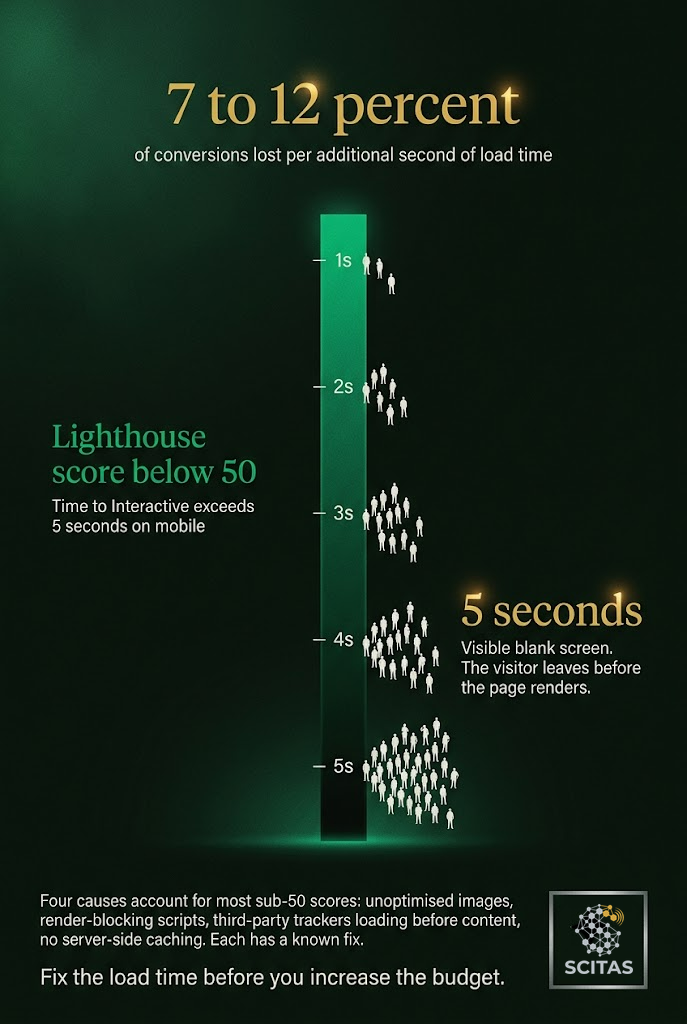
The conversion penalty for slow loading is not subtle. Google’s own research and published case studies from conversion rate optimisation practitioners have consistently found that each additional second of load time reduces conversions by 7 to 12 percent. At a Lighthouse Performance score below 50, you are typically looking at a First Contentful Paint above 3 seconds and a Time to Interactive above 5. For mobile users on a standard 4G connection, that means a visible blank screen for long enough that a significant proportion leaves before seeing your content.
What the Score Is Measuring
A Lighthouse Performance score below 50 does not mean your website is broken. It means the loading experience is slow enough to cause measurable visitor abandonment before they have had a chance to engage with your content or your offer.
The six metrics that compose the score — First Contentful Paint, Largest Contentful Paint, Total Blocking Time, Cumulative Layout Shift, Speed Index, and Time to Interactive — map directly to what a visitor perceives during load. A high Total Blocking Time means the page appears visually complete but the user cannot interact with it. A Cumulative Layout Shift above 0.1 means buttons and text are moving on screen, causing mis-taps and frustration. Both of these are invisible to the site owner reviewing the finished design and highly visible to the visitor on a slower device or connection.
The Ad Spend Problem
Paid advertising amplifies the cost of a poor Lighthouse score. An SMB spending on Google Ads, Meta Ads, or any cost-per-click traffic source is paying for visitors who may leave before the page loads. The conversion tracking system records a click; the analytics platform records a session; the site owner pays the cost. The visitor saw nothing.
A Lighthouse Performance score below 50 means you are paying to send visitors to a page that repels them before they engage. The campaign manager looks at a poor return on ad spend and may conclude the targeting was wrong, the creative was weak, or the audience was not ready to buy. The root cause was a five-second blank screen.
The order of operations matters. Fixing Core Web Vitals before scaling paid spend changes the economics of every campaign that follows. A site loading in under 2 seconds converts at a measurably higher rate than the same site loading in 5. The ad budget has not changed; the return per pound spent has.
Where the Score Fails
Four failure modes account for the majority of sub-50 scores on SMB websites. First: unoptimised images served at full resolution to mobile devices. Second: render-blocking JavaScript loaded synchronously in the document head, forcing the browser to pause rendering until scripts execute. Third: third-party scripts from analytics platforms, chat widgets, and ad tracking running before page content is visible. Fourth: no server-side caching on pages rebuilt on every request.
Each of these has a known fix. Image optimisation through WebP conversion and lazy loading is a standard workflow. Render-blocking JavaScript is resolved by deferring non-critical scripts. Third-party script impact is managed through loading strategies that prioritise first-party content. Server-side caching is a configuration change, not a rebuild.
A Lighthouse audit run in Chrome DevTools or PageSpeed Insights identifies which of these failures are present and ranks them by their impact on the score. The diagnostic report points directly to the files and scripts causing the delay. Addressing the top two or three items by impact typically moves a sub-50 score above 70 and cuts Time to Interactive by enough to recover the majority of the conversion loss, before a new campaign goes live.
